


A better cloakroom starts before the counter
Digital cloakrooms with Tapla: a better experience before and after the counter
Tapla connects reusable cloakroom tags with a digital ticket on the guest’s phone. The aim is simple: move preparation away from the counter, keep identification attached to the item and give staff a shared overview.
Start with a coat, a bag and a colleague. Test the whole process before choosing a complete number series.

The concert was great. The company was good. But the last thing the guest remembers is twenty people ahead of them, a missing cloakroom ticket and a member of staff searching for one black coat among a hundred others.
For you, the problem is bigger than the queue. It is the repeated questions. The paper tickets to handle. The coat that has slipped off its hanger. The bag that belongs to the same guest but is stored somewhere else. And a team working hard while everyone wants to leave at once.
The problem is rarely that staff are working too slowly
A traditional cloakroom brings many tasks together in one place: instructions, tickets, payment, tagging and hanging. When every guest has to go through the same steps at the same counter, the queue grows quickly.
At collection, the work often starts only when the guest is standing in front of a member of staff. Someone has to read the number, find the coat, collect any accompanying bag and check everything. If one ticket is missing, everyone else in the queue feels the delay.
Tapla’s philosophy is to change the order. The guest can prepare part of the process in advance. Staff can focus on receiving, organising and returning items correctly. Good cloakroom management is about both software and the way people, belongings and information move through the space.
How a digital cloakroom with Tapla works
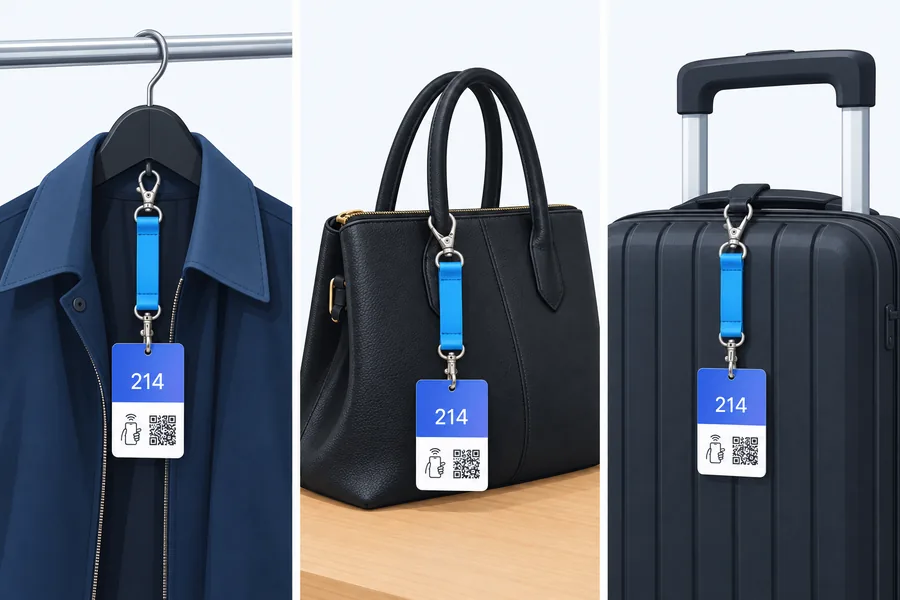
- The guest takes a tag and gets ready. An available Tapla Tag is attached to the coat or bag. Using NFC on a compatible phone or the tag’s QR code, the guest opens their ticket in the browser. They can do this while queuing. There is no need to download an app or create a guest account.
- Staff receive the item. The guest hands it over with the tag attached. A member of staff checks the process and any payment, then places the item in the agreed zone. The number and colour help the team follow the same system.
- Collection can be prepared in advance. The guest can send a collection request from their phone before reaching the counter. Staff have the opportunity to find the item and mark it ready.
- The item is returned and the tag is reused. Staff check the ticket and the relevant item, complete the process and take the tag back. A collection request is not the same as a completed handover.
The business creates its own free Tapla account and activates its tags there. This is separate from a guest registering an item during a visit.
The tag follows the coat – even when the coat moves
A hanger number tells you which hanger to look for. A cloakroom tag attached to the coat tells you which item to look for. The difference becomes clear when a coat falls down, is moved or is put on a different hanger.
That is why Tapla’s core idea is to attach the tag to the item. The number and colour follow the coat or bag through the cloakroom while the guest keeps the digital ticket. Ordinary hangers can be part of the setup.
This does not remove the need for an organised cloakroom. Use clearly defined zones, such as blue 001–100, and make sure the tags are easy to see. The tag identifies the item; your organisation makes it easy to find.
Which type of cloakroom sounds like yours?
The music venue: everyone leaves at once
After the last song, the cloakroom changes within minutes. Advance requests and a clearly marked preparation area are useful here: staff can start finding coats before each guest reaches the counter. Where possible, separate collection from new enquiries.
The nightclub: a steady flow all evening
Some guests arrive while others leave. Tags need to return to circulation and a new team needs to take over smoothly. Fixed colour zones, clear roles and a shared handover check make it easier to work consistently across shift changes.
The conference: coats, bags and a train to catch
Here, guests’ luggage matters just as much as their coats. Plan bag storage from the start, use a consistent routine for multiple items and explain the process clearly to international guests. Test the languages and devices your audience uses.
The hotel or private event: the cloakroom is part of your hospitality
The cloakroom may be free for guests or paid for by the organiser. Here, the value lies particularly in clear identification and a calm collection experience. Online payment is a choice, not a requirement for running a cloakroom with Tapla.
The community group or temporary event: a simple routine for the whole team
If your cloakroom only opens for certain events, training needs to be easy to remember. Run through the complete process with volunteers before opening. Reusable tags and software without an ongoing subscription make the model relevant between events too.
Two items: a simple colour routine as an alternative to three-part cloakroom tickets
Three-part cloakroom tickets are often used when one guest checks in two items. The practical task is the same digitally: keep track of both belongings and make sure the guest takes both home.
Example: red means two items
You can decide that a guest with both a coat and a bag always receives two red Tapla Tags – one for each item. At collection, red is the staff’s reminder to check that both items have been found before completing the handover.
The two tags each have their own identity. Record which two tag numbers belong together and check both at collection. Make sure both are registered correctly to the guest and test the complete process with your setup. The colour rule is your shared working routine. Colour alone does not show which two items belong together or automatically link tags in the software.
Write the rule down, display it at the workstation and use both the number and colour when checking items. Also agree what the team should do if the guest only wants their bag for now. A simple rule is only useful when everyone understands the exceptions.
Get the coat ready while the guest is still on their way
An advance collection request lets the cloakroom start searching earlier. For example, the guest can send a request before leaving the auditorium. The staff display helps bring requests together, and the guest display can show when the item is ready.
The benefit comes from using the time before meeting at the counter. Set up a defined preparation area, assign responsibility and agree what happens to a retrieved coat if the guest does not arrive. Otherwise, you simply move the clutter from the rail to the counter.
Tapla offers simple and more detailed cloakroom workflows, along with browser displays on devices including tablets. Choose the flow that suits your staffing and space, and try it under realistic conditions.
See where your cloakroom could be easier to run. Order demo tags and let one colleague be the guest and another the staff member. Test a coat plus a bag too.
Order Tapla demo tagsExplore Tapla’s featuresMore than a digital cloakroom ticket
- Tickets in the browser and Wallet: The guest uses their phone and can choose Apple Wallet or Google Wallet. This provides an alternative to a loose paper ticket.
- Optional mobile payment: Tapla describes online payment using Apple Pay, Google Pay and cards. Payment at the counter is also an option. Available payment methods depend on the country, currency and setup.
- Your own branding: Customise the digital ticket with your logo and colours, so guests see a recognisable part of your venue.
- A shared staff overview: Owner, manager and staff roles, together with invitations by link, let you allocate access according to responsibilities.
- Help finding the right record: Searching by tag number or the last four digits of the phone number can support staff in their work. Always follow your checking procedure before handing over an item.
- A better basis for planning: The dashboard, event and season overviews, occupancy, revenue and forgotten-coat information, plus Excel exports, can help you investigate busy periods and follow up after an event.
Use the figures alongside what you see on the floor. The number of registrations alone does not tell you how many people should be on shift. Bags, walking distances, questions and peak demand also matter.
Standard tags from stock or cloakroom tags with your own print

If you are still deciding, start with demo tags. They give you something tangible to try with your own coats, bags, phones and colleagues.
Standard Tapla Tags are the choice when you want set colours and standard numbering without custom printing. The standard version is part of our stocked range and is activated on your free Tapla account. Check the product page for current stock and delivery information.

Custom-printed Tapla Tags are for venues that want their own logo or design on their cloakroom tags. This makes the tag a visible part of your venue and can match your other guest materials. Production and delivery depend on the chosen solution.
Tapla’s current model is software without an ongoing subscription. Physical tags are purchased separately and reused. Integrated online payment may involve payment fees; check the current terms and prices before activating the payment service.
Six improvements you can make to your cloakroom straight away
- Move instructions earlier. Show guests what to do before they reach the counter. Have a staff member help in the queue when demand requires it.
- Create fixed zones. Separate receiving, storage, preparation and collection wherever space allows.
- Use colours and numbers consistently. Use the same labels on rails, signs and staff instructions.
- Plan for exceptions. Agree how to help guests without a usable phone, a flat battery, a missing ticket or an item that cannot immediately be found.
- Test before guests arrive. Check internet access, charging, payment and a complete check-in and collection. Have an agreed fallback procedure.
- Measure your own improvement. Record waiting times during busy periods, the team’s total workload and the situations that interrupt the flow. Compare similar events.
The philosophy going forward: solve what actually makes cloakrooms difficult
A cloakroom solution needs to suit real guests. Some bring one coat. Others come as a family, share responsibility for bags or need to collect something during the event. Meanwhile, the operations manager needs better information for the next event.
These are the challenges we want to help with: clearer processes for groups and multiple items, better handling of unusual situations, and more useful data connecting the cloakroom with the rest of the operation. This is a direction for discussion and further development, not a promise of specific integrations or features by a particular date.
Start by testing the cloakroom you have. Your practical experience is more valuable than another feature nobody needs.
Questions about Tapla and digital cloakroom tags
Our cloakroom already works. Why consider Tapla?
Look at the work around each item: preparing paper tickets, taking payment at the counter and searching at collection. Tapla can move registration and optional payment into the queue and enable earlier preparation. Compare a trial with your current routine before deciding.
We are busy. Do we have to change the whole cloakroom now?
Start with demo tags and a quiet trial with a colleague. Practise check-in, collection and exceptions, then try a limited event. This gives you practical evidence and time to train the team before the next peak.
Will Tapla fit our hangers, colours and numbering?
You can use ordinary hangers because the tag stays with the item. Keep clear zones and a consistent colour and numbering routine. Choose standard or custom-printed tags to suit your needs. Existing paper tickets or plastic tokens do not automatically become Tapla Tags.
What does it cost, and must guests pay online?
You buy the physical tags and reuse them. Tapla’s current base model is a free profile with no recurring software subscription. Online payment is optional and may incur fees; check the current terms. Your cloakroom can therefore also be free for guests or included in the event price.
Do guests need to install an app?
No. NFC or QR opens the ticket in the browser. Guests do not need a regular Tapla account. Your business needs an account to activate and manage tags.
Can we use Tapla if our cloakroom is free?
Yes. Online payment is optional. You can use the solution for identification and cloakroom flow even when guests do not pay for storage.
What if a guest has no NFC, smartphone or phone battery?
Without NFC, guests can scan the tag’s QR code. If their phone cannot be used, staff must help using an agreed verification procedure. Searching by tag number or the last four phone-number digits can help locate the record, but does not itself prove entitlement to the item.
Will the cloakroom work if the internet fails?
Plan for a reliable connection and test coverage where guests and staff will stand. A saved Wallet ticket does not mean the entire system works offline. Agree on a backup connection and a shared procedure before the event begins.
Can we handle a coat and bag like a three-part cloakroom ticket?
Use one tag per item and a clear pairing routine. For example, two red tags can tell staff to check for two items. Record the matching numbers and check both. Colour does not automatically link tags in the software; also test collection of just one item.
How do we avoid handing an item to the wrong guest?
Use the tag number, ticket and your agreed checks together. A collection request only asks staff to prepare an item. Staff must check the current record and the item before handover. A screenshot or a stated phone number should not be the only evidence.
Does it remove the need for cloakroom staff?
No. Staff receive, store, find and return the items. Tapla helps with preparation, identification and an overview of the work.
Can the cloakroom tags be reused?
Yes. The tag is returned after the handover is completed and can be used for a new check-in. Establish a regular routine for checking, cleaning and storing tags.
What is the best way to get started?
Order demo tags. Create your account, activate them using the supplied instructions and run a trial with your own team. Include both a straightforward coat check and a guest with two items in the test.
Let the cloakroom end the evening as well as it began
You do not need to decide on the whole solution today. The first step is to see how Tapla works with your space, your team and your guests.
Try check-in, preparation and collection. Then choose standard tags or tags with your own print.